OTA firmware updates are how a connected product gets fixes and new features after it ships, without anyone touching it. They are also one of the easiest ways to brick a product in a customer’s home. This guide explains how OTA firmware updates work, and the failures that matter most.
What an OTA update is
OTA stands for over-the-air. The device downloads new firmware through Wi-Fi, cellular or Bluetooth and installs it by itself, with no cable and no visit. For a product with thousands of units in the field, this is the only practical way to ship a fix.
How an update works, step by step
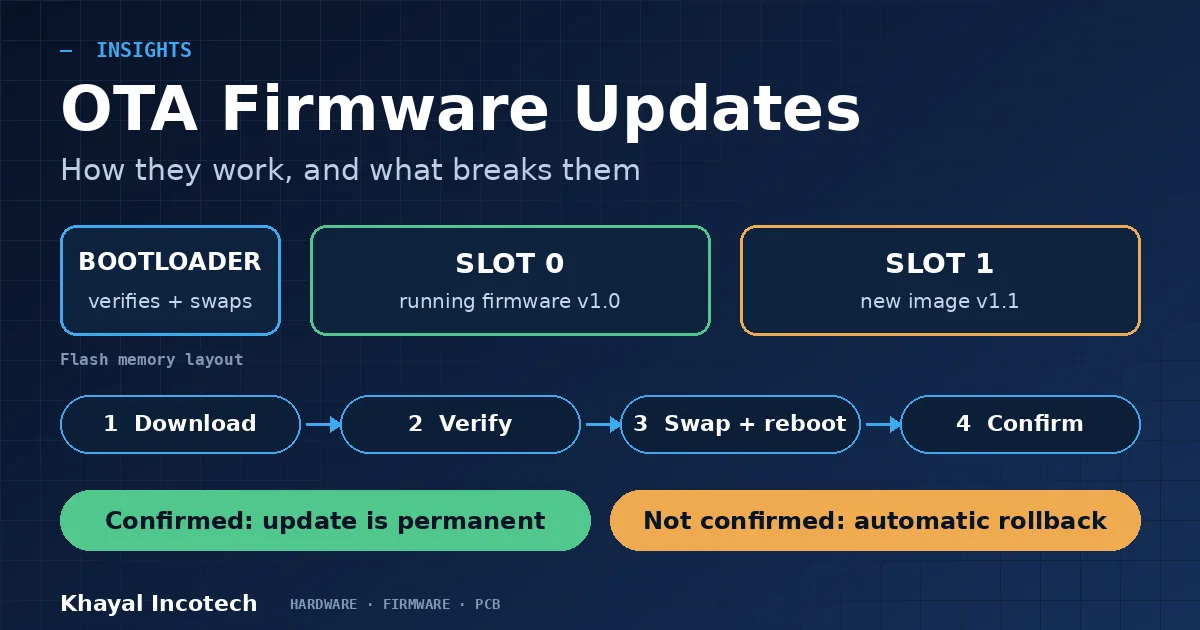
Most designs split the flash memory into a bootloader and two image slots. The running firmware lives in the first slot, and the second slot is where the update waits.
The running firmware checks for a new version, downloads it securely and writes it into the second slot. It marks the new image as pending and reboots. At startup, the bootloader runs before anything else. It sees the pending image, checks it and swaps it in.
The new firmware then has to confirm that it works. If it does, the update becomes permanent. If it crashes or never confirms, the bootloader reverts to the old version at the next boot. That fallback is what keeps a bad update from bricking the device.
Many ESP32 projects do this with a partition table, a small file that lays out the flash. It defines two application slots, often called app0 and app1, so the running image can stay in one slot while the new one is written to the other.
The bootloader does the heavy lifting
The bootloader is a small, separate program that runs before your application. Open-source MCUboot is a common choice, and it is the default bootloader for Zephyr. It supports several upgrade methods.
Overwrite simply copies the new image over the old one. It is simple, but it has no safety net, and if power fails halfway through, the device can end up with half an image. Swap methods exchange the two images in steps and track progress, so an interrupted update can resume or roll back. Swap-move is usually the better choice because it avoids a dedicated scratch area and wears the flash less.
Why signing matters
Every update image should be signed. You sign it with a private key at build time, and the bootloader checks the signature with the matching public key before it runs anything.
This protects against corrupted downloads and against someone loading malicious firmware. It also means your private key is one of the most valuable things in the project, so keep it out of shared folders and off laptops.
What breaks OTA in the field
Power loss during an update is the classic failure. Use a fail-safe upgrade method, and test it by cutting power at random points during the swap, many times.
The second failure is a missing confirmation step. If the application marks itself as good the moment it boots, a firmware that starts but cannot connect will stay in place. Make it confirm only after a real self-test, such as a successful radio connection and working sensors.
The third is a flash layout mistake. Slot sizes, offsets and the metadata area have to match exactly, and most integration problems come from there and not from the application code. The bootloader is rarely updated after launch, so plan the layout early and leave room for the firmware to grow.
The fourth is a slow link. A large image over Bluetooth can take minutes, and LoRaWAN carries only tiny messages, so updating a full image needs special support and a lot of patience. Our guide to BLE vs LoRa explains why.
The fifth is updating everything at once. Roll out to a small group first, watch for problems, then expand. A bad update that reaches every unit at the same time is the most expensive kind.
Plan OTA at the start
Two image slots mean the flash has to hold two copies of the firmware, so the partition layout can change which chip and how much flash you pick. For how the chip choice affects battery life, see our guide to ESP32 vs nRF52 battery life.
Updates can also affect certification. A firmware change that alters how the radio behaves can have regulatory consequences, which we touch on in our guide to FCC certification vs SDoC. Decide the update policy before you freeze the design.
How we approach it
Our smart kitchen appliance ships with over-the-air firmware updates and a rollback option, and we have used MCUboot on other projects. We know how much of an OTA design lives in the hardware and the flash plan, and not only in the firmware.
If your product needs OTA, talk to us about firmware development before the flash map is fixed. Not sure what your design needs? Tell us what it does and we will tell you where the risks are.